Once a customer has registered as a user on your site, you can then upgrade the account to be a trade account. Once this has been done you can then user this user account type to promote special discounts / promo codes or even products to only apply to these customers when they are logged in to your site.
About the Trade Customer Role
The trade customer role will have already of been setup within your WordPress site by a member of the MediaLinksOnline team if it was in the original project brief. The only difference between this user type and a standard customer role is that it gives you the chance to open up discounted prices specifically to customers that you choose, so anyone that you want to have this special feature, needs to be set to this user type.
Changing the User Role
In your WordPress dashboard area click on users > all users from the menu list. Then you need to click on the username that you want to change the user role for.
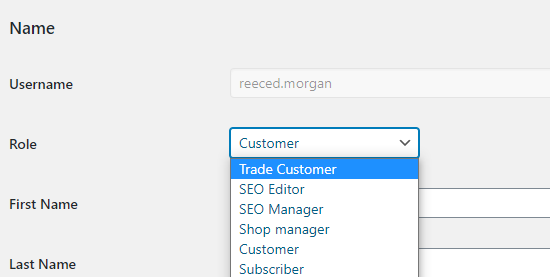
When you are in the user edit screen, simply change the user role to 'Trade Customer' and then save the changes using the button at the bottom of the page.